
Getting Started
This guide explains how to connect your systems to Replenit and complete a first end-to-end ingestion flow with test records.
What You Will Accomplish
By the end of this guide, you will:
- Authenticate with the Replenit Ingestion API
- Ingest a customer record
- Ingest a product catalog record
- Ingest an order referencing that product and customer
- Verify ingestion and processing status in the Replenit platform
This establishes the minimum data foundation required for decision evaluation and downstream activation.
Prerequisites
Before starting, ensure you have:
- Access to the Replenit platform
- A tenant created in Replenit
- API key with access to the tenant
- Admin or equivalent access, or coordination with your platform administrator
If you do not have access, contact your Replenit Customer Success Manager (CSM).
1Obtain API Credentials
API access is authenticated using an API key.
Where to Find API Keys
Replenit Dashboard → Settings → API Key Management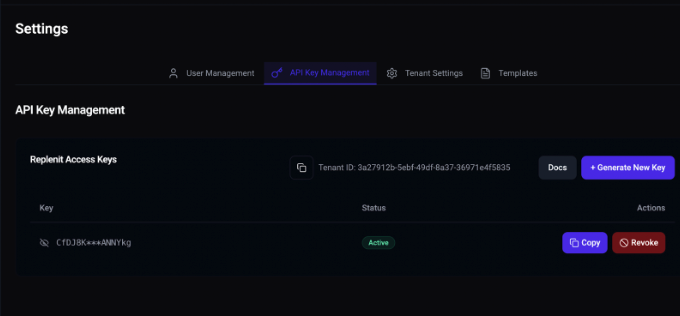
Actions:
- Generate a new API key
- Store it securely
- Do not commit it to source control
API keys may be authorized across one or multiple tenants. Tenant behavior is determined by the tenantId provided in the request path.
2Identify Your Tenant ID
Each request requires a tenantId path parameter.
The tenant ID:
- Is a GUID
- Identifies which tenant configuration applies
- Determines identifier strategy and processing behavior
You can find the tenant ID in Replenit Dashboard → Settings → API Key Management
3Verify Authentication
Send a minimal request to confirm authentication and tenant access.
Example: Create a Customer Record
curl -X POST "https://api.replen.it/customers/{tenantId}" \
  -H "Content-Type: application/json" \
  -H "x-replenit-auth-key: YOUR_BASE64_ACCESS_KEY" \
  -d '[
    {
      "CustomerId": "C-001",
      "GdprOptin": true
    }
  ]'
Expected Response
{
  "success": true,
  "message": "Customers saved.",
  "data": {
    "count": 1,
    "processedAt": "2024-12-22T14:40:00Z"
  }
}
This confirms:
- API key is valid
- Tenant access is correct
- Payload format is accepted
4Ingest a Product
Products must be ingested before or alongside orders so that order items can be resolved correctly.
Example: Create a Product with One Variant
curl -X POST "https://api.replen.it/products/{tenantId}" \
  -H "Content-Type: application/json" \
  -H "x-replenit-auth-key: YOUR_BASE64_ACCESS_KEY" \
  -d '[
    {
      "ProductId": "P-001",
      "ProductVariants": [
        {
          "VariantId": "V-001",
          "Sku": "SKU-001"
        }
      ]
    }
  ]'
Product identifiers must align with:
- Orders API references
- Tenant product identifier configuration
5Ingest an Order
Orders connect customers and products and represent transactional behavior.
Example: Create an Order
curl -X POST "https://api.replen.it/orders/{tenantId}" \
  -H "Content-Type: application/json" \
  -H "x-replenit-auth-key: YOUR_BASE64_ACCESS_KEY" \
  -d '[
    {
      "OrderId": "O-001",
      "CustomerId": "C-001",
      "Currency": "USD",
      "TotalRevenue": 99.99,
      "OrderItems": [
        {
          "ProductId": "P-001",
          "Sku": "SKU-001",
          "Quantity": 1,
          "Price": 99.99
        }
      ]
    }
  ]'
This validates:
- Order ingestion
- Customer linking
- Product resolution
6Verify Ingestion in Replenit
After ingestion, records are processed asynchronously.
You can monitor ingestion and processing status in:
Replenit Dashboard → Data and Health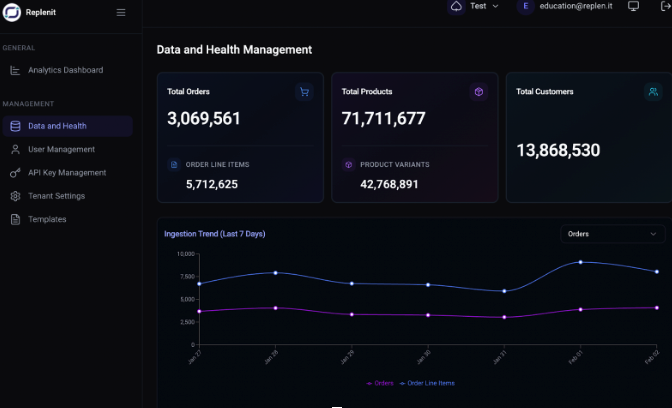
This view shows:
- Record counts
- Processing status
- Data health indicators
Visibility depends on tenant permissions.
Important Notes
Arrays Are Required
All ingestion endpoints expect arrays, even for single records.
Identifier Strategy Matters
Identifier behavior is defined at the tenant level:
Replenit Dashboard → Settings → Tenant SettingsMisaligned identifiers are a common cause of ingestion or activation issues.
GDPR Processing Control
GdprOptin controls whether a customer record is eligible for processing.
trueRecord may be processed and activatedfalseRecord may be stored but excluded from processing
Replenit does not infer consent.
What Is Explicitly Out of Scope
The Ingestion API does not handle:
- Campaign execution
- Channel orchestration
- Message rendering
- Business rule authoring
- UI-level personalization
These concerns are handled by downstream platforms or by Replenit decision outputs once data is ingested.
Next Steps
After completing ingestion:
- 1Review identifier configuration
- 2Connect downstream platforms (CRM, marketing automation, analytics)
- 3Validate decision outputs and activation flows
Related Documentation
Need help or have questions?
Our team is ready to assist you. Reach out to us at support@replen.it