
Replenit Ingestion API | Complete Guide
Document Type
Public API Reference Guide
Audience
Engineering, Architecture, Data, IT
API Version
v1.1
Status
Live
Stability
Backward-compatible within major version
Change Policy
Additive changes only unless versioned
Base URL
https://api.replen.it
SLA
99.9% uptime
Overview
The Replenit Ingestion API is the primary upstream data interface for the Replenit Decision Engine.
It enables you to synchronize customers, orders, and product data from source systems into Replenit, where this data is evaluated and used to generate customer- and product-level commercial decisions. These decisions are executed by downstream systems such as CRM platforms, marketing automation tools, advertising platforms, analytics solutions, and customer support systems.
The API is designed for continuous, production-grade data ingestion. It does not trigger campaigns or orchestrate messaging. Its responsibility is to provide accurate and timely data to the decisioning layer, Replenit's Maestro.
Typical Use Cases
- ERP / DWH platforms syncing transactional data
- CRM or CDP systems updating customer profiles and consent states
- Product and inventory systems syncing catalog changes
- Enterprise data pipelines feeding decision intelligence
Scope and Non-Goals
In Scope
- Ingestion of customer, order, and product data
- Validation and normalization of inbound data
- Deterministic processing into the Replenit Decision Engine
Non-Goals
The Ingestion API itself does not perform or manage the following activities:
- Campaign execution
- Channel orchestration
- Message rendering
- Business rule authoring
- UI-level personalization
These activities may be handled either by downstream execution platforms (e.g. CRM, marketing automation, advertising, analytics, or support systems) or by Replenit platform capabilities that operate after data ingestion and decisioning.
Versioning and Compatibility
- The API follows a major-version compatibility model
- Breaking changes require a major version increment
- Minor and patch updates are backward compatible
- Deprecations are communicated in advance with a defined migration window
Clients are expected to integrate against a specific major version.
Key Capabilities
Performance and Reliability
- Sub-100ms average response times under normal load
- Batch ingestion support for high-volume data synchronization
- Idempotent upsert behavior to support safe retries
- Production-grade availability and monitoring
Security and Compliance
- API key–based authentication
- Encrypted transport (TLS)
- Strict request validation
- GDPR-aligned data handling
Developer Experience
- RESTful JSON interface
- Consistent request and response formats
- Deterministic error messages with field-level feedback
- Clear separation of concerns across endpoints
Quick Start
Prerequisites
To begin integration, you need:
- An active Replenit tenant
- A Tenant ID (GUID format)
- An API key associated with the tenant
Tenant access is provisioned during onboarding and managed via your Replenit Panel.
You will receive access to the platform during onboarding and can generate API keys or obtain your TenantId under API Key Management Section.
1Create a Customer Record
curl -X POST "https://api.replen.it/customers/YOUR_TENANT_ID" \
  -H "Content-Type: application/json" \
  -H "x-replenit-auth-key: YOUR_API_KEY" \
  -d '[{
    "CustomerId": "quickstart-001",
    "Email": "test@example.com",
    "Name": "Test",
    "Surname": "User",
    "EmailOptin": true,
    "GdprOptin": true
}]'2Validate the Response
{
  "success": true,
  "message": "Customers saved.",
  "data": {
    "count": 1,
    "processedAt": "2024-12-22T14:40:00Z"
  }
}
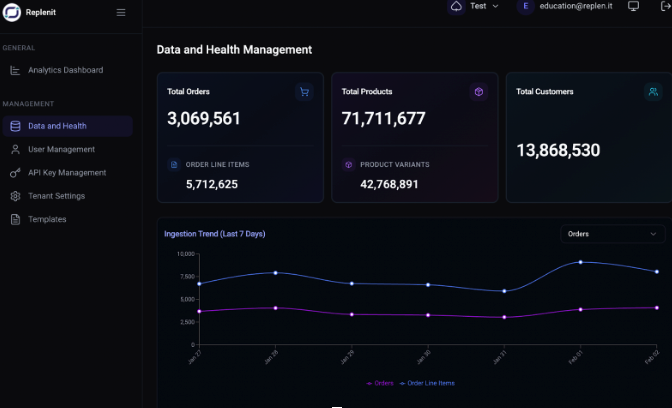
Data becomes visible in the Replenit platform after processing completes. You can also see the number of records processed and recorded on the Replenit panel under the Management → Data and Health, which can be accessed via login.
3Validate Order and Product Ingestion
After successfully ingesting a customer record, the next step is to submit representative Order and Product payloads. This validates ingestion across all core data domains and confirms that related entities can be processed consistently.
This step is intended to confirm that:
- Order and product endpoints are reachable and authenticated
- Payload structures are accepted and validated
- Identifiers used across customers, orders, and products are consistently processed
Ingest an Order
Use the following example to submit an order with a single line item. This validates order-level fields, currency handling, and item structure.
curl -X POST "https://api.replen.it/orders/YOUR_TENANT_ID" \
  -H "Content-Type: application/json" \
  -H "x-replenit-auth-key: YOUR_API_KEY" \
  -d '[{
    "OrderId": "O-001",
    "Currency": "USD",
    "TotalRevenue": 99.99,
    "OrderItems": [
      {
        "ProductId": "P-001",
        "Sku": "SKU-001",
        "Quantity": 1,
        "Price": 99.99
      }
    ]
  }]'
A successful response indicates that the order payload has been accepted for processing.
Ingest a Product
Use the following example to submit a product definition with a single variant. This validates catalog structure and variant identifiers referenced by order line items.
curl -X POST "https://api.replen.it/products/YOUR_TENANT_ID" \
  -H "Content-Type: application/json" \
  -H "x-replenit-auth-key: YOUR_API_KEY" \
  -d '[{
    "ProductId": "P-001",
    "ProductVariants": [
      {
        "VariantId": "V-001",
        "Sku": "SKU-001"
      }
    ]
  }]'
Architecture
Core Data Domains
| Domain | Purpose | Typical Update Pattern |
|---|---|---|
| Customers | Identity and preferences | Real-time or batch |
| Orders | Transactional behavior | Near real-time |
| Products | Catalog and availability | On change or scheduled |
These domains are evaluated together within the Replenit Decision Engine to determine what action, if any, should occur downstream.
Authentication
All API requests to the Replenit Ingestion API require authentication using an API key.
Authentication is performed by passing the API key via the x-replenit-auth-key HTTP header.
x-replenit-auth-key: YOUR_BASE64_API_KEYAPI Keys
API keys are generated and managed in the Replenit platform.
An API key may be authorized to operate across one or multiple tenants.
Tenant-specific behavior is determined by the tenantId provided in the request path, not by the API key itself.
Operational configuration such as identifier strategy, supported languages, supported currencies, timezone, and processing rules is resolved per tenant, based on the tenant referenced in the API request.
When an API key is used across multiple tenants, each request is evaluated independently according to the configuration of the referenced tenant.
Managing API Keys
API keys are managed in the Replenit platform under:
Management → API Key ManagementFrom this section, authorized users can:
- Generate new API keys
- Copy existing keys
- Revoke keys that are no longer in use
- View associated Tenant IDs
Access to API key management is typically restricted to platform administrators.
If you do not have access to this section or have questions about API key setup, permissions, or tenant access, please contact your Replenit Customer Success Manager (CSM) or your internal platform administrator.
Tenant ID
All ingestion endpoints require a tenantId to be provided as part of the request path.
Examples:
The tenantId determines which tenant configuration is applied for request validation, identifier resolution, normalization, and processing.
Tenant IDs can be obtained from the Replenit platform and are visible in the API Key Management section or the detailed guide below.
Security and Storage
API keys must be stored securely and treated as sensitive credentials.
- Do not commit API keys to source control
- Do not expose API keys in client-side environments (browsers, mobile applications)
- Use environment variables or secure secret management systems
- Rotate API keys periodically according to internal security policies
API keys are tenant-authorized credentials and grant access to ingestion endpoints according to their assigned permissions.
Error Handling
Authentication-related errors include:
401 Unauthorized
- • Missing x-replenit-auth-key header
- • Invalid or malformed API key
- • Revoked API key
403 Forbidden
- • API key does not have access to the referenced tenant
Full documentation: Replenit Ingestion API | Authentication
API Reference
Base URL
https://api.replen.itRequest Format
All POST endpoints expect an array payload, even for single records.
[
  { "field": "value" }
]
Rate Limits
100
requests per minute
5,000
requests per hour
Rate-limit headers are included in all responses.
Data Standards
Datetime
ISO 8601 (UTC)
Currency
ISO 4217
Language
IETF BCP 47
Encoding
UTF-8
Error Handling
Common Status Codes
| Code | Description |
|---|---|
| 200 | Success |
| 400 | Validation error |
| 401 | Authentication failure |
| 404 | Tenant or resource not found |
| 429 | Rate limit exceeded |
| 500 | Server error |
Detailed error reference: Replenit Ingestion API | Error Responses
Operational Responsibilities
Your Responsibilities
- Ensure correctness and completeness of submitted data
- Implement retry and backoff logic
- Respect rate limits
- Secure API keys and credentials
Replenit Responsibilities
- API availability per SLA
- Deterministic validation and processing
- Clear error reporting
- Backward compatibility within major versions
Support
When contacting support, include:
- Tenant ID
- Timestamp (UTC)
- Endpoint and payload (sanitized)
- Full error response
Support: support@replen.it
Additional Resources
Getting Started
Quick start guide for new integrations
Authentication
API authentication and security
Customers API
Customer data ingestion reference
Orders API
Order data ingestion reference
Products API
Product catalog ingestion reference
Best Practices
Recommended integration patterns
Error Responses
Error handling and troubleshooting
Rate Limits
API rate limiting policies
Need help or have questions?
Our team is ready to assist you. Reach out to us at support@replen.it