
Best Practices Guide
Standards, formats, and operational recommendations for Replenit Ingestion API usage
Overview
This guide defines the operational conventions used for ingesting customers, orders, and products into Replenit.
It covers payload format standards, batching, identifier alignment, error handling, and security. Where applicable, it references tenant-level configuration managed in the Replenit platform.
Language Format Standards (IETF BCP 47)
Replenit uses IETF BCP 47 language tags for all language fields provided via the API.
Language is treated as a data attribute supplied by upstream systems. It is not configured or restricted at tenant level.
Format
language[-script][-region][-variant]Examples
| Language Tag | Description |
|---|---|
| en | English (generic) |
| en-US | English (United States) |
| en-GB | English (United Kingdom) |
| es-ES | Spanish (Spain) |
| es-MX | Spanish (Mexico) |
| fr-FR | French (France) |
| fr-CA | French (Canada) |
| de-DE | German (Germany) |
| pt-BR | Portuguese (Brazil) |
| zh-CN | Chinese (Simplified, China) |
| zh-TW | Chinese (Traditional, Taiwan) |
Conventions
- Language subtag: lowercase (
en) - Region subtag: uppercase (
US) - Script subtag: title case (
Hans)
Language values are consumed as provided and are used for downstream decisioning and activation logic.
Currency Format Standards (ISO 4217)
Replenit uses ISO 4217 three-letter currency codes.
Requirements
- 3-letter alphabetic codes only
- Uppercase only
- Do not use symbols
Examples
| Code | Currency |
|---|---|
| USD | US Dollar |
| EUR | Euro |
| GBP | British Pound |
| JPY | Japanese Yen |
| CHF | Swiss Franc |
| PLN | Polish Złoty |
| TRY | Turkish Lira |
| AED | UAE Dirham |
Tenant Configuration Note
Supported currencies are defined at tenant level in the Replenit platform and used for reporting and analytics. They do not change API request validation.
Datetime Format Standards (ISO 8601)
All datetime fields must follow ISO 8601.
Examples
2025-12-22T14:30:00Z
2025-12-22T14:30:00.000Z
UTC is recommended.
Identifier Strategy and Alignment
Identifier consistency is required to ensure correct entity resolution and downstream activation.
Customer Identifiers
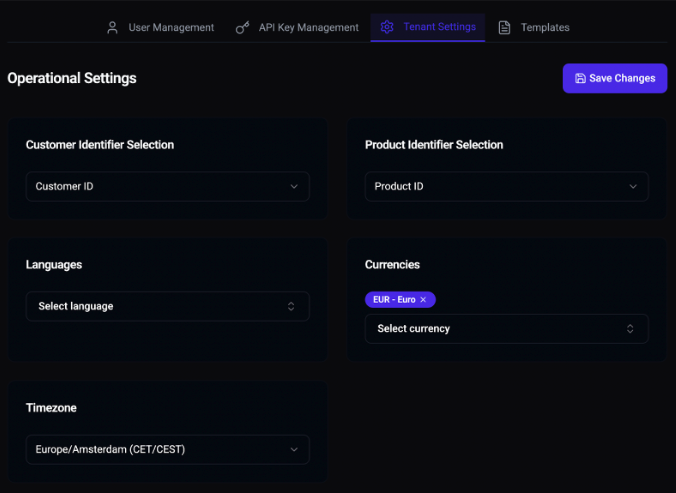
Each tenant has one primary customer identifier, configured in the Replenit platform:
- •
CustomerId - •
Email
Configuration path:
Replenit Dashboard → Settings → Tenant Settings → Customer Identifier SelectionOperational Rules
- The configured identifier is used for matching and upsert logic
- Secondary identifiers may be stored but are not used for identity resolution
PII Considerations
- When a stable CustomerId exists and is consistently used downstream, Email should not be used for identity resolution
- Email may be provided only when required for downstream communication
- Replenit does not require Email when CustomerId is sufficient
Product Identifiers
Each tenant has one primary product identifier, configured in the Replenit platform:
- •
ProductId - •
Sku
Configuration path:
Replenit Dashboard → Settings → Tenant Settings → Product Identifier SelectionOperational Rules
- Products API and Orders API must reference the same product identifier
- Primary product identifiers must remain stable over time
Admin access is required to modify identifier settings. If access is not available, contact your platform administrator or your Replenit Customer Success Manager (CSM).
Batch Processing
All ingestion endpoints expect arrays, even for single records.
Recommended Batch Sizes
| Entity | Batch Size |
|---|---|
| Customers | 100–500 |
| Orders | 50–200 |
| Products | 50–100 |
Batching improves throughput and reduces rate-limit pressure.
Validation Before Sending
Upstream systems should validate:
- Required fields
- Identifier presence
- Data types
- Field length constraints
- ISO-compliant datetime values
- Valid currency and language formats
Error Handling and Retries
Status Code Handling
| Status | Description | Action |
|---|---|---|
| 400 | Validation error | Do not retry |
| 401 | Authentication error | Check credentials |
| 403 | API key does not have access to tenant | Check permissions |
| 404 | Tenant not found | Verify tenant ID |
| 429 | Rate limit exceeded | Backoff and retry |
| 500 | Transient server error | Retry with backoff |
Retry Guidance
- Retry only on
429and500 - Use exponential backoff with jitter
- Keep batches small enough to isolate invalid records
Rate Limit Hygiene
Respect rate limit headers when present:
X-RateLimit-Limit
X-RateLimit-Remaining
X-RateLimit-Reset
Retry-After Batching is strongly recommended.
Security Practices
- Store API keys securely (environment variables or secret managers)
- Do not commit keys to version control
- Do not expose keys in client-side environments
- Rotate keys periodically
API keys are managed in the Replenit platform:
Replenit Dashboard → Settings → API Key ManagementAdmin access is required. If access is not available, contact your platform administrator or your Replenit Customer Success Manager (CSM).
Operational Visibility
Ingestion activity and processing status can be monitored in:
Replenit Dashboard → Data and HealthThis includes:
- Processed record counts
- Data health indicators
- Ingestion status
Access depends on tenant permissions.
Related Documentation
Need help or have questions?
Our team is ready to assist you. Reach out to us at support@replen.it